
Smart Nation
 ++
++
The Brief
Your entire home, automated. Every switch controlled from one app.
In a typical Indian home there are 20–30 switches controlling lights, fans, and appliances. Instead of replacing every device, the idea was to make the switchboard smart.
Smart Nation's hardware fits into existing switchboards, enabling control of any connected device through one app, no rewiring, no replacing appliances. The goal was to create a simple experience with full control, reliable automations, and technology that works effortlessly in everyday life.
40+
Installed across homes, offices & commercial spaces

280+
Smart switches live, every tile, state and icon designed

3 mo
First sketch to live product

Control, Simplified
++A home has rooms, rooms have devices, devices have states. Most smart home apps bury this under layers of menus. I designed around how people actually think: room first, device second. One screen shows everything that matters. Tap once to control. A 10-year-old and a 70-year-old should both get it without anyone explaining anything.

Switch States
On glows and asserts. Off steps back. Offline warns before you try, so you never tap a device that isn't listening.
Try tapping the switches →
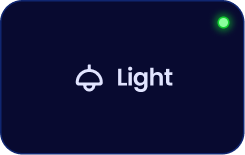
On
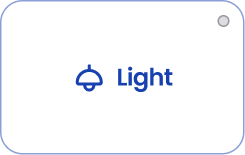
Off
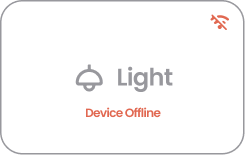
Offline
Hardware in Hand, Online in Minutes
++IoT setup is where trust breaks. Most users assume the product is broken the moment it takes more than five seconds. I redesigned provisioning into a linear flow: detect, connect, name, assign, confirm. Every step tells you exactly what's happening. The screen stays calm so the user does too.


Switchboard to Dashboard in Four Taps
++Once the hardware is in the wall, the homeowner should own it completely, no dependency on the installer after day one. I designed this flow to be fully self-serve: pick the board, pick the module, give it a name. Four taps and any family member can map a new switch themselves.


Set It Once, Live Freely
++Two modes, not one, because the use cases are fundamentally different. Routine handles fixed daily habits: lights on at 6am, geyser at 6:30, fans off at bedtime. Timer handles spontaneous needs: run the AC for 90 minutes, then off. Merging them would have confused both. Kept visually separate, each with its own logic.

Design System
++Brand Colours
Primary
#080A30
Secondary
#2A3281
Accent
#386BF6
Background
#FFFFFF
Card
#E5E7EB
Typography
Poppins
A B C D E F G H I J K L M N O P Q R S T U V W X Y Z
a b c d e f g h i j k l m n o p q r s t u v w x y z
0 1 2 3 4 5 6 7 8 9
Onboard Large
Smart Nation
28px · Bold
Onboard Medium
Smart Nation
16px · Bold
Onboard Small
Smart Nation
13px · Regular
Body Large
Your home, automated.
16px · Regular
Body Medium
Your home, automated.
14px · Regular
Body Small
Your home, automated.
12px · Regular
Appliance Icons
Material Icons covered the basics, but Indian homes needed more: ceiling fans, geysers, inverter ACs. I extended the library by drawing the missing appliances and altering existing icons to match, keeping the same grid and stroke weight across all 40+ types.

Navigation Icons, Idle to Active


Logo Making Process

Session 01
We started with a shortlist of names. Half a dozen candidates, each tested with a rough mark. These sheets are the work of narrowing: trying each name on a shape, seeing which combination had weight and felt like it could live on a product.
Session 02
The name was finalized and the brief sharpened immediately. From here it was clear: build a mark that felt both local and modern. We explored, debated, circled one direction, and committed to it.
Session 03
The chosen direction went through iterations of proportion, stroke weight, and the custom power-button O. Once the static mark was locked, the last step was motion: how does the brand come alive on screen for the first time.
App Icon
The icon changes with context: festivals, launches, seasons. The brand stays recognisable, the moment feels considered. Tap to preview on device.
++

Beta


Beta
go ahead, tap one!
Landing Page
++
I designed and developed Abhiyantrik Solutions' complete website experience, from initial sketches to a fully interactive platform. The site showcases Smart Nation's innovative home automation products through immersive product demonstrations, allowing visitors to experience the technology before they buy.
Visit website ↗smartnation.online++Flow
++
From Concept to Deployment
Started with the idea of bringing an interactive product experience into the website itself, so users could feel the product before they buy. Concept got confirmed, then moved into full Figma design for the entire site. Created all 3D assets and visuals in Blender and Photoshop. Moved into development using Claude AI to vibe-code and complete the build, then deployed live.
Interactive Product Experience
++Traditional product pages tell. Interactive experiences sell. I built two core product demonstrations that let users actually feel the Smart Nation ecosystem right in their browser.
go ahead, give it a try!
Click any switch to toggle

Synced mobile app


Living room
Smart MCB
3D Product Mockups
++

Packaging Design
++Simple and minimal. The packaging stays out of its own way: clean surfaces, restrained typography, and just enough brand presence to feel intentional without being loud.

Brochures & User Guides
++SWB

MCB

Outcome
Shipped in three months, now live in 40+ spaces.
From first sketch to a live product: brand, app, switch interface, packaging and print. 280+ smart switches now run across homes, offices and commercial spaces.


